ni esto: localizar todas las agujas de urdimbre protegidas
Esta guía detalla las ubicaciones de las 85 agujas de urdimbre en Infinity Nikki. Las agujas de urdimbre son cruciales para viajar rápidamente y acceder a los reinos, comenzando con el ámbito de la escalada. Activar cada aguja es esencial para su uso. Para teletransportarse, localice la aguja en el mapa, resalte y seleccione la opción Teleport.
todas las agujas de deformación en el infinito Nikki
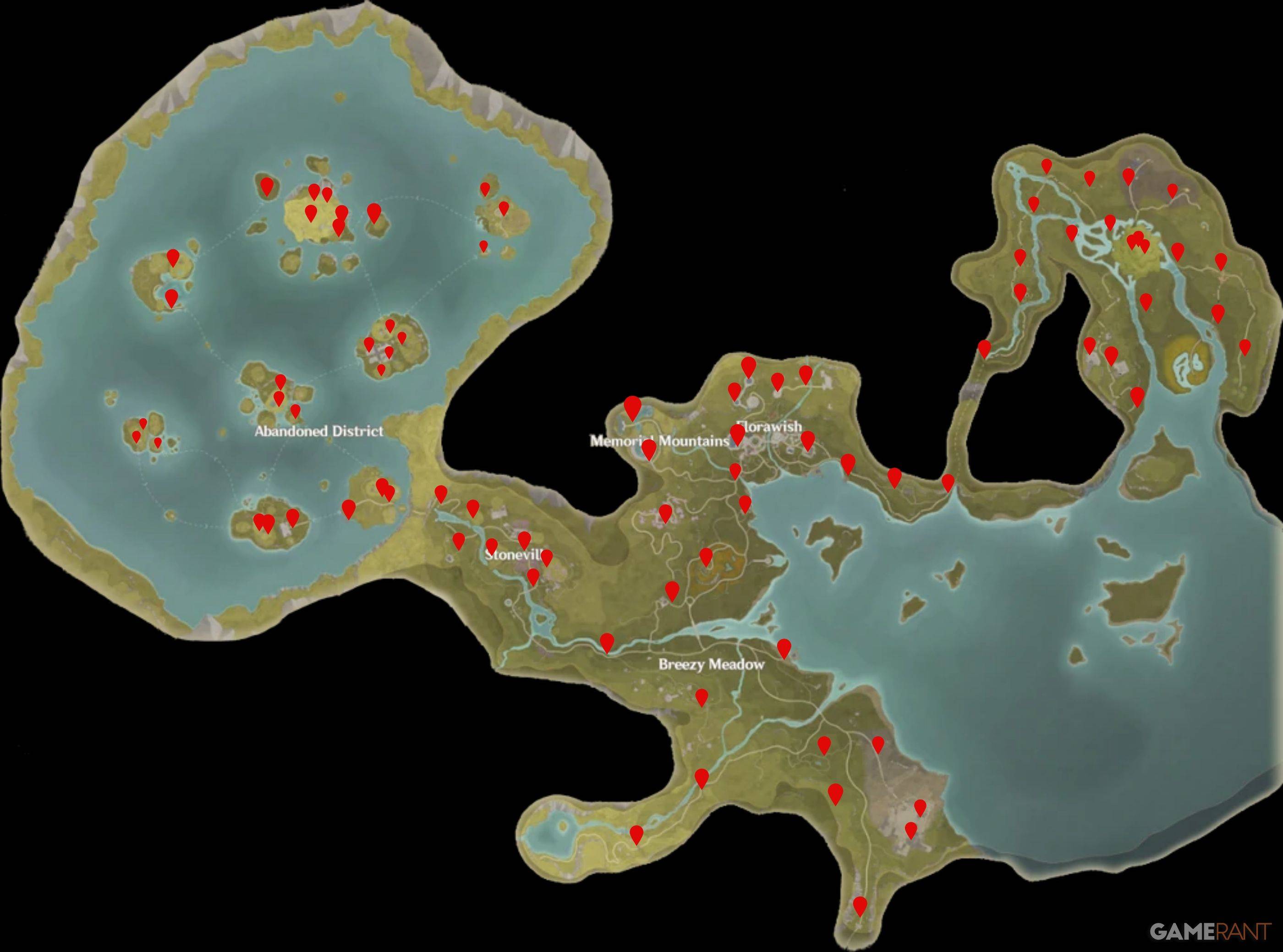
Montañas Memoriales Warp Spires
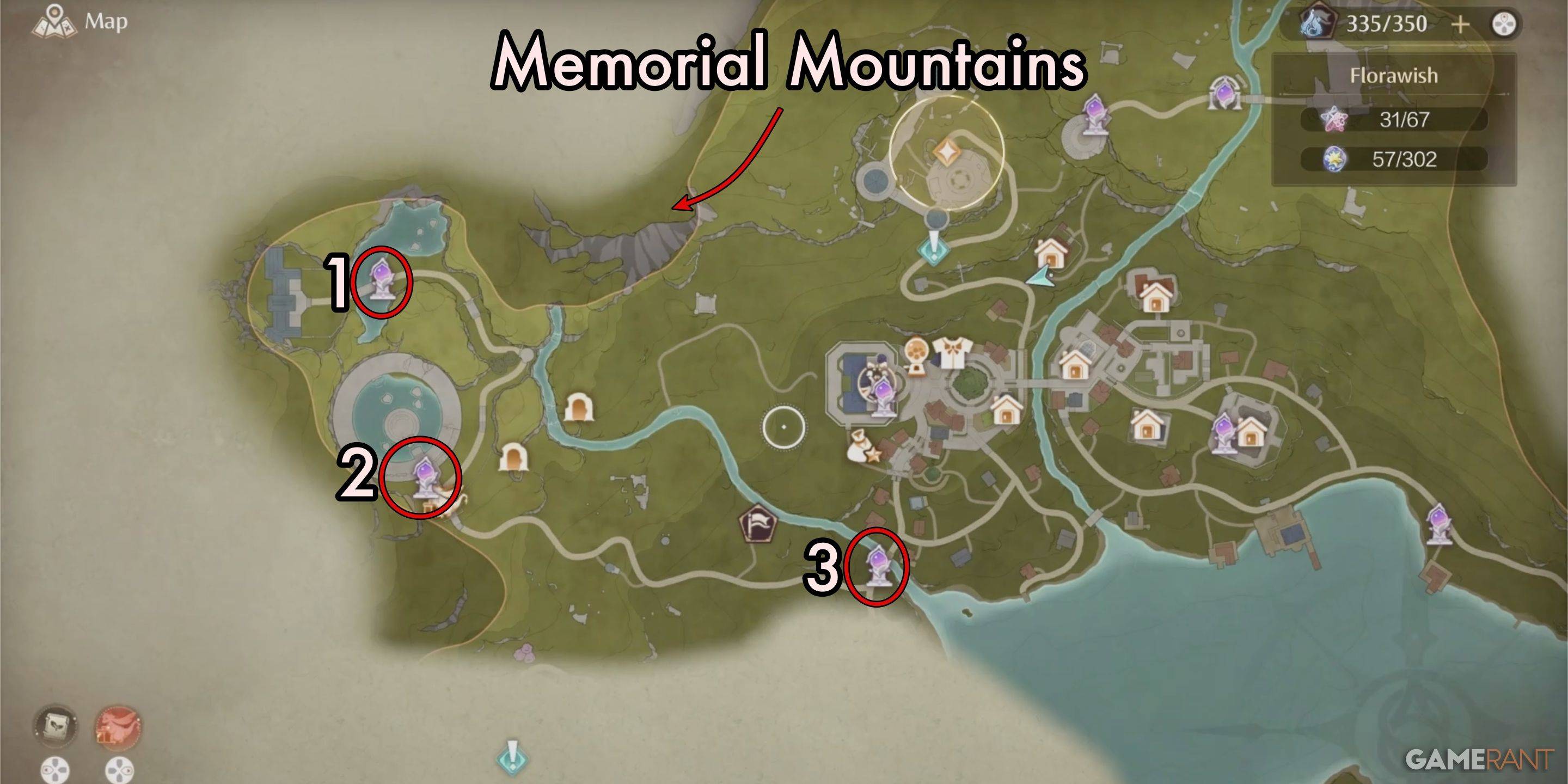
| Spire Number | Warp Spire Name |
|---|---|
| 1 | By the Stylist's Guilds Memorial |
| 2 | Beside the Statue in the Old Florawish Memorial |
| 3 | Florawish Lane |
Florawish Warp Spires
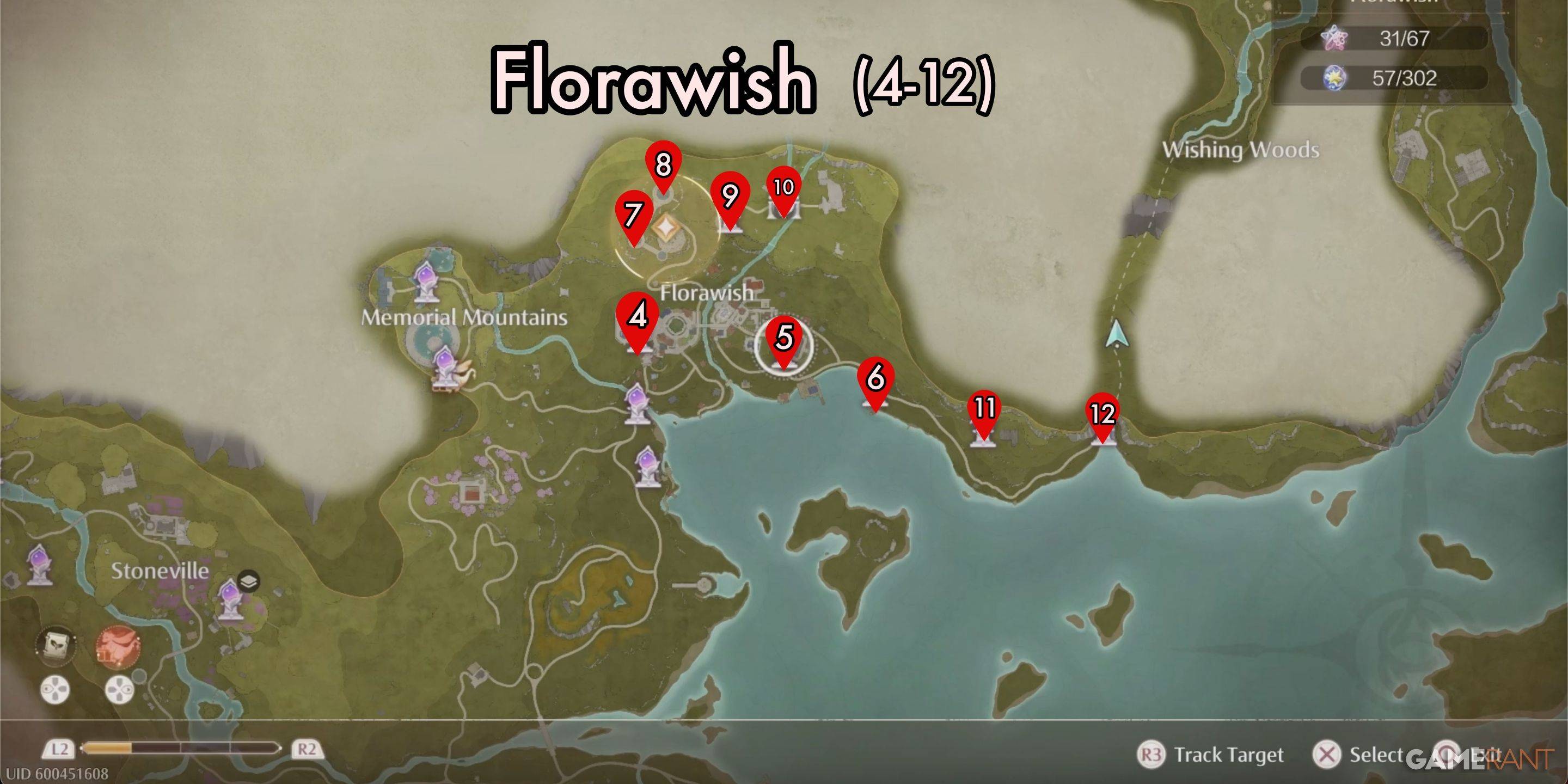
| Spire Number | Warp Spire Name |
|---|---|
| 4 | Stylist's Guild Front Gate |
| 5 | In Front of the Mayor's Residence |
| 6 | Stitch Street |
| 7 | Dream Warehouse Tower |
| 8 | Dream Warehouse Rooftop |
| 9 | Secret Base |
| 10 | Well of Fortune |
| 11 | In Front of the Sanctum of the Observant |
| 12 | Wish Pass |
Breezy Meadow Warp Spires
| Spire Number | Warp Spire Name |
|---|---|
| 13 | The Leisurely Anglers Florawish Branch |
| 14 | Cicia Art Academy Field Base |
| 15 | Bug Catcher's Cabin |
| 16 | Meadow Activity Support Center |
| 17 | Meadow Wharf |
| 18 | Relic Hill |
| 19 | Lakeside Hill Lane |
| 20 | Queen's Palace Ruins Entrance |
| 21 | Queen's Palace Ruins Front Yard |
| 22 | Queen's Palace Ruins High Tower |
| 23 | Queen's Palace Ruins West Forest |
| 24 | Heartcraft Kingdom Outpost |
| 25 | Abandoned Fanatic Wisher Camp Outpost |
| 26 | Abandoned Fanatic Wisher Camp |
Stoneville Warp Spires
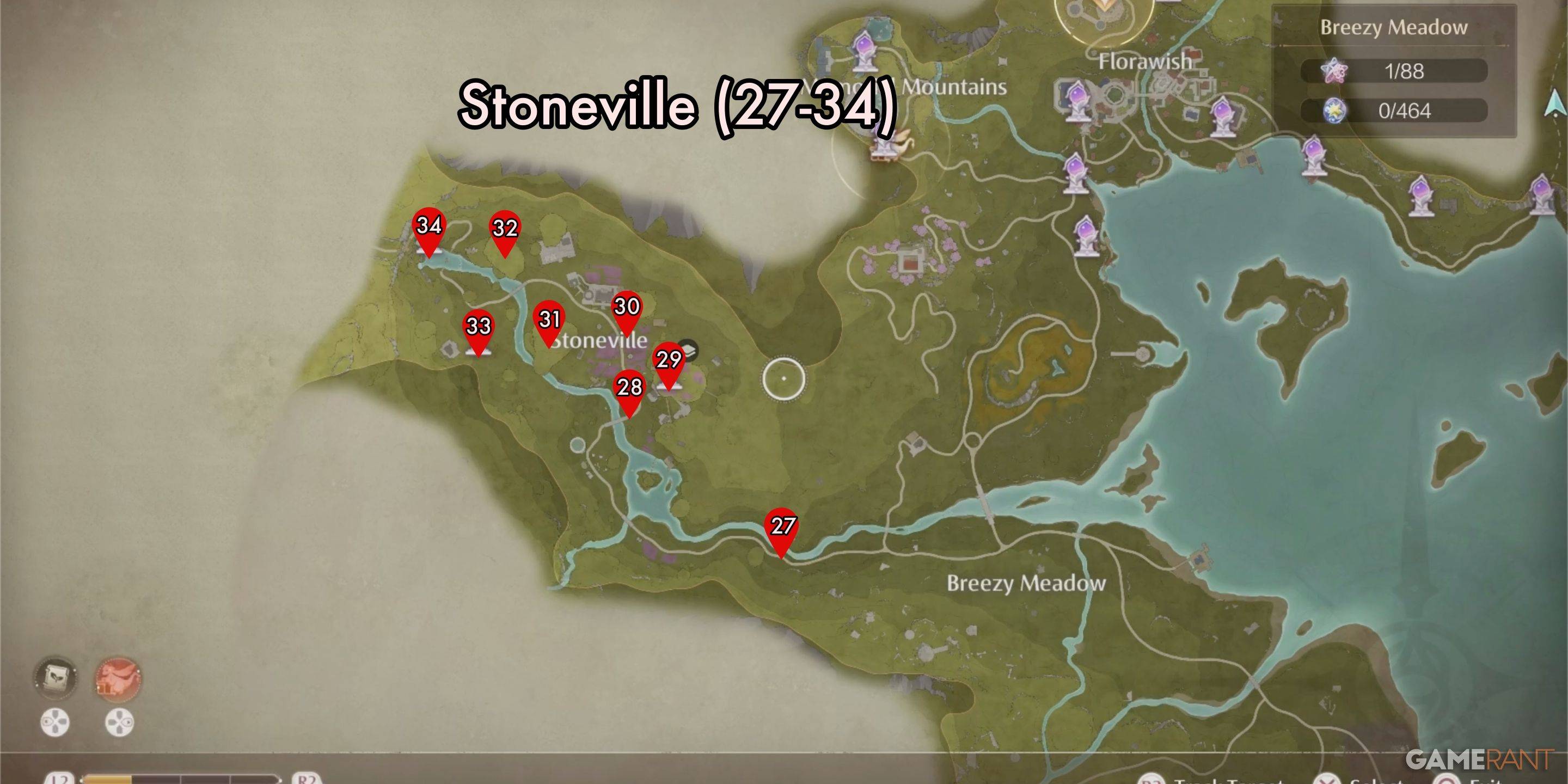
| Spire Number | Warp Spire Name |
|---|---|
| 27 | Stoneville Entrance |
| 28 | Village Fork |
| 29 | Flamecrest Stonetree |
| 30 | Lavenfringe Fields |
| 31 | Gliding Training |
| 32 | Dye Workshop |
| 33 | Cicchetto Manor |
| 34 | Rockfall Valley |
Sigres de urdimbre del distrito abandonado
| Spire Number | Warp Spire Name |
|---|---|
| 35 | Beside the Golden Fields |
| 36 | Golden Fields Stonetree Top |
| 37 | Golden Fields Old Dock |
| 38 | Beside the Ripple Wine Cellar |
| 39 | Barrel Grove |
| 40 | Barrel Home |
| 41 | Windrider Mill Entrance |
| 42 | Windrider Mill Top |
| 43 | Windrider Mill Mid-Level |
| 44 | Market of Mirth Entrance |
| 45 | Market of Mirth Summit Path |
| 46 | Handsome Lads Circus |
| 47 | Choo-Choo Station Old Platform |
| 48 | Choo-Choo Station Shipping Center |
| 49 | Choo-Choo Station Repair Station |
| 50 | Choo-Choo Station Stonetree Top |
| 51 | Ghost Train Entrance |
| 52 | Stellar Fishing Ground Trail |
| 53 | Stellar Fishing Ground Peak |
| 54 | Thuddy Squash Workshop |
| 55 | Volunteer Corps Jail |
| 56 | Stonecrown Peak |
| 57 | Waterspots Observatory |
| 58 | Volunteer Corps Watchtower 1 |
| 59 | Wishing Well |
| 60 | Volunteer Corps Watchtower 2 |
| 61 | Prosperville Entrance |
| 62 | Stone Steles |
| 63 | Forgotten Village Dwelling |
Deseando Woods Warp Spires
| Número de espira | Warp Spire Nombre |
|---|---|
| 64 | El laboratorio de belleza de Timi |
| 65 | Taller Waterwheel |
| 66 | Entrada de la granja |
| 67 | Bizarre Wish Hills |
| 68 | Desperation Orb Warehouse |
| 69 | Shoal |
| 70 | Grand Tree Shoal |
| 71 | Área residencial de Grand Tree |
| 72 | Templo de los deseos |
| 73 | Garrison de los Paladines |
| 74 | Swordsmith Ruins Entrance |
| 75 | Cascada de Flower Valley |
| 76 | Wish Celebration Center |
| 77 | Elderwood Riverbank |
| 78 | frente al centro de inspección de deseos |
| 79 | Wishcraft Lab |
| 80 | Swordsmith Ruins Gate |
| 81 | Ruinas de los Guardianes |
| 82 | cueva aislada |
| 83 | Campamento ascético |
| 84 | Aurosa Valley |
| 85 | Tierra de Starfall |
Esta lista completa asegura que no se perderá ninguna de estas ubicaciones vitales en su viaje infinito Nikki. Slope
Últimos artículos
It looks like you're referencing a playful or ironic statement combining Zelda: Breath of the Wild with a dramatic "Lacks DLC" comment — possibly poking fun at the game’s original release not including downloadable content (DLC), which is common in many other franchises.
To clarify:
Zelda: Breath of the Wild (2017) was released as a standalone, full-featured game without DLC at launch. This was actually a rare and praised choice — Nintendo delivered a complete, expansive open world with no need for post-launch content.
The game’s expansion, The Legend of Zelda: Tears of the Kingdom (2023), was released as a direct sequel, not DLC — a full standalone game that continues the story and world from Breath of the Wild.
So, yes — Breath of the Wild truly "lacks DLC" — but that’s not a flaw. It was a deliberate design decision to give players a complete, polished experience from day one.
🔥 Fun takeaway:
"Breath of the Wild lacks DLC — and that’s exactly why it’s legendary."
In fact, many fans and critics argue that this "no DLC" approach set a new gold standard for how open-world games should be built — complete, cohesive, and satisfying on its own.
So, while your tweet-style line "Zelda: Breath of the Wild Lacks DLC" might sound like a critique at first, it's actually a clever way to highlight the game’s strength — not a weakness. 💚🗡️
🎮 Final Verdict: Not lacking DLC… just perfectly complete.
Lectura
As of now, there is no official confirmation from id Software or Bethesda that Doom: The Dark Ages is an actual game—or that it has launched at all. In fact, Doom: The Dark Ages does not exist in any official capacity as a released title.
The statement “Doom: The Dark Ages Is id's Biggest Launch Ever” appears to be either a fictional or satirical claim, possibly circulating online as a joke, a fan-made concept, or misinformation. The Doom franchise, developed by id Software and published by Bethesda, has had major launches in the past—such as Doom (2016) and Doom Eternal (2020)—both of which were critically acclaimed and commercially successful.
If Doom: The Dark Ages were to be a real announcement, it would be major news in the gaming world and widely reported by outlets like IGN, GameSpot, and The Verge. As of now, no such announcement exists.
In short: No, Doom: The Dark Ages is not id’s biggest launch ever—because it hasn’t launched at all. It may be a myth, a fan theory, or an internet meme. Always check trusted sources like official game websites, press releases, or major gaming news platforms for accurate information.
Lectura
Welcome to the digital world of Doki Doki Literature Club!* — the psychological horror visual novel that took the internet by storm — now officially arrives on Android with a fresh, immersive update featuring exclusive new side stories and an all-new music player!
Originally released for PC, Doki Doki Literature Club! has captivated millions with its seemingly innocent high school club life, charming characters, and a twist that shatters the fourth wall. Now, fans and newcomers alike can experience the full journey on their Android devices, complete with enhanced mobile optimization and a sleek, responsive interface tailored for touch.
What’s New in the Android Release?
🎮 Exclusive Side Stories
Dive deeper into the lives of the Literature Club members with three brand-new side stories, never before seen in any version of the game. Explore hidden moments between Sayori and her friends, uncover secrets from Yuri’s past, and get a glimpse into Natsuki’s heartfelt journey beyond the baking club. These stories expand the emotional depth of the characters and offer fresh perspectives on the events that unfold.
🎧 Built-In Music Player (Exclusive Feature)
For the first time, Doki Doki Literature Club! features a fully integrated music player that lets you enjoy the game’s haunting soundtrack anytime — even when not playing. Curated by the game’s composer, the player includes:
Full OST of the original game
Bonus tracks from the new side stories
Sleep mode and shuffle features
Custom playlist creation (perfect for late-night mood sessions)
The music player runs seamlessly in the background, letting you listen to tracks like "The Feelings of the Literature Club" and "I'm So Sorry" while using other apps — a nostalgic touch for fans who’ve long wanted to relive the emotional rollercoaster.
🎨 Visual & UX Improvements for Mobile
Touch-friendly navigation with swipe gestures
Adjustable text size and display settings
Battery and performance optimization for long play sessions
Optional dark mode for late-night gaming
Why It’s a Must-Play on Android
Whether you’re a longtime fan who remembers the first time you questioned reality in the game’s diary pages, or a new player drawn in by the cult following, this Android release is a must-have. The story’s emotional twists and psychological depth are more powerful than ever on mobile — perfect for playing in quiet moments, curled up in bed.
Available now on Google Play and the official Doki Doki Literature Club! website.
Download it today and step into the club — but be warned… something’s not quite right.
“It’s not just a game. It’s an experience.”
— The Doki Doki Community
⚠️ Note: The game contains themes of mental health, anxiety, and horror. Recommended for ages 16+.
Stay curious. Stay cautious. The Literature Club is waiting. 📒🖤
Lectura
Controllers and Sensors > Calibrate Joy-Con)
Cleaning the analog sticks (advanced DIY, risk of damage)
Contacting Nintendo Support for repair/replacement (if under warranty or eligible for free repair)
🔍 Tips to Avoid Issues:
Use a reliable HDMI cable (e.g., Amazon Basics, Belkin, or other well-reviewed HDMI 2.0 cables).
Keep Joy-Cons clean—wipe them regularly and avoid dusty environments.
Avoid extreme temperatures, which can affect performance.
Check for firmware updates on your Switch (Settings > System > System Update).
Summary:
⚠️ There is no "Nintendo Switch 2" or "Official Switch 2 HDMI Cable" yet.
✅ Use a high-quality HDMI 2.0 cable to avoid display issues.
❌ But it will not fix Joy-Con drift or connection problems.
If you're having Joy-Con issues, focus on calibration, cleaning, or getting official repair support, not cable replacement.
Let me know if you'd like recommendations for HDMI cables or how to fix Joy-Con drift!"
class="uk-flex uk-flex-middle">As of now, there is no official Nintendo Switch 2 released by Nintendo, so the idea of using an "Official Nintendo Switch 2 HDMI Cable" is not accurate or applicable. The current model available is the Nintendo Switch (2017), and its updated version, the Nintendo Switch OLED Model (2021).
However, if you're experiencing issues with your Joy-Cons—such as drifting, unresponsiveness, or poor connection—there are a few helpful tips to keep in mind, and using a proper HDMI cable can help rule out certain display-related issues, but it won't fix Joy-Con hardware problems directly.
Here's what you should know:
✅ Use a High-Quality HDMI Cable (Not Necessarily "Official")
The Nintendo Switch uses a standard HDMI 2.0 cable, not a proprietary one.
While Nintendo does sell an official HDMI cable, it's not required. A high-quality, certified HDMI 2.0 cable (or higher) will work just as well and often at a better price.
Avoid cheap or low-quality HDMI cables, as they can cause:
Flickering or distorted video
No signal (black screen)
Audio issues
If you're having display problems, test with a known working HDMI cable to rule out video issues.
❌ Joy-Con Drift Is Not Fixed by HDMI Cables
Joy-Con drift (where the stick moves on its own) is a hardware issue, typically caused by worn-out analog sticks or dust/contamination inside.
Using a different HDMI cable will not fix Joy-Con drift.
Solutions for drift include:
Calibrating the Joy-Con (Settings > Controllers and Sensors > Calibrate Joy-Con)
Cleaning the analog sticks (advanced DIY, risk of damage)
Contacting Nintendo Support for repair/replacement (if under warranty or eligible for free repair)
🔍 Tips to Avoid Issues:
Use a reliable HDMI cable (e.g., Amazon Basics, Belkin, or other well-reviewed HDMI 2.0 cables).
Keep Joy-Cons clean—wipe them regularly and avoid dusty environments.
Avoid extreme temperatures, which can affect performance.
Check for firmware updates on your Switch (Settings > System > System Update).
Summary:
⚠️ There is no "Nintendo Switch 2" or "Official Switch 2 HDMI Cable" yet.
✅ Use a high-quality HDMI 2.0 cable to avoid display issues.
❌ But it will not fix Joy-Con drift or connection problems.
If you're having Joy-Con issues, focus on calibration, cleaning, or getting official repair support, not cable replacement.
Let me know if you'd like recommendations for HDMI cables or how to fix Joy-Con drift!
Lectura
Juegos de tendencia










Noticias principales







Últimos juegos